One click from CAD to a robot you can simulate

Cad2Robot is a Fusion 360 add-in. Press one button on the assembly you already modelled and get a URDF, a MuJoCo scene and a robot.json carrying your real motors, gearboxes and cameras.

Free. Built by BAM Robotics for its own robots.

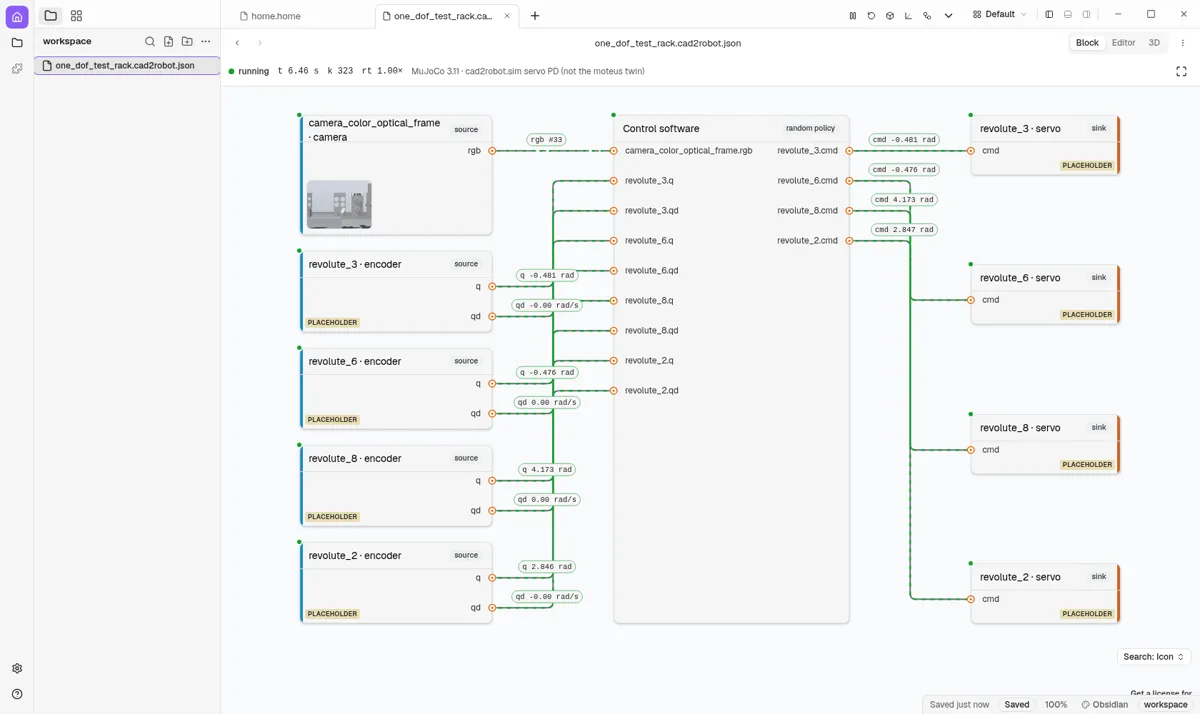
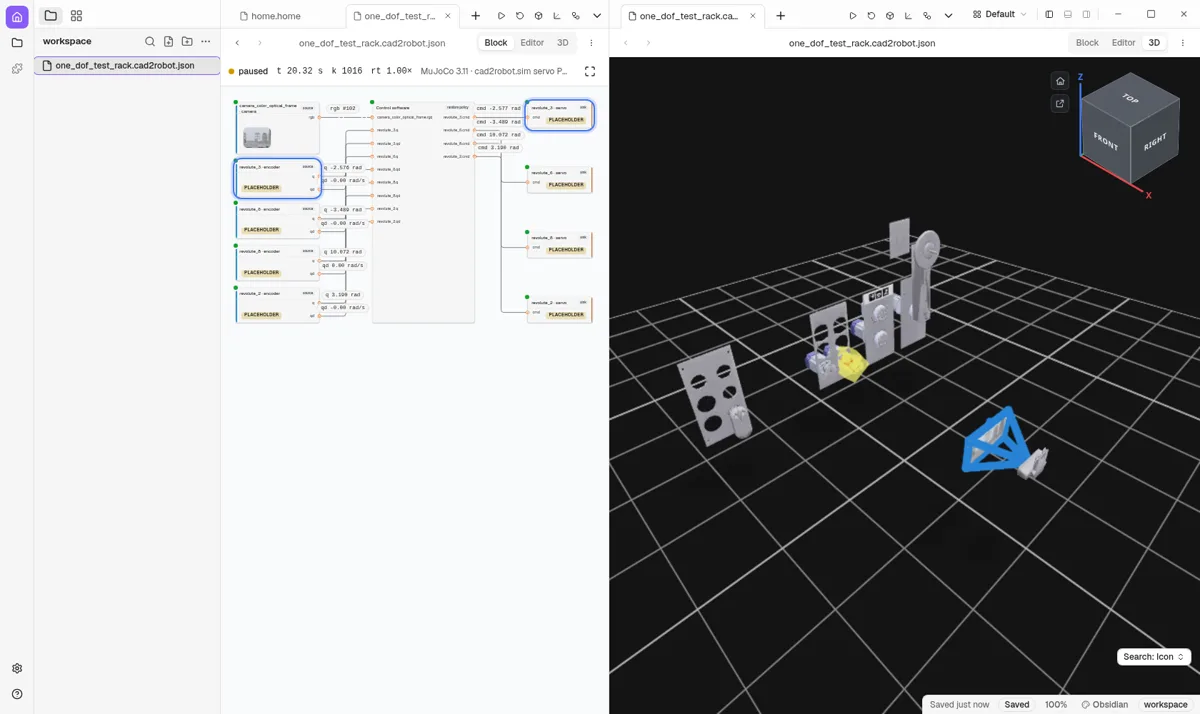
Recorded 14 Oct 2026: one exported bundle (BAM's one-DoF test rack) running in MuJoCo, drawn live as a block diagram (left) and in 3D (middle), with MuJoCo's own window on the same run (right). PLACEHOLDER tags mark parts still waiting for a datasheet.

How it works

Model the way you always do. Cad2Robot reads the design and never edits it, so you can export as often as you like.

1

Model in Fusion, the way you already do

Joints, joint limits and the visibility icons are the whole interface. There are no export tags, no naming rules and no copy of the model to keep in sync. Hide a part and it stays out of the robot.

2

One press opens the Cockpit

Before it writes anything, the add-in shows what it understood: the subassembly, joint and link trees, in Fusion's own order. A closed loop such as a four-bar is drawn with its closing joint as a dashed back-edge, and anything it cannot read becomes a warning. Nothing is silently dropped.

The Cockpit's joint and link views on a test design (recorded 20 Sep 2026). Rigid groups collapse into links; the four-bar's closing joint is the dashed red edge.
3

Datasheets as Python dataclasses

Motors, gearboxes, drivers, servos and cameras are typed Python files you can read, diff, review and have an AI write. Each datasheet names the CAD parts it describes, and its gear ratio, rotor inertia, limits and CAN id flow into the export.

Parts that have no datasheet yet still export, labelled as placeholders rather than guessed.

# parts/actuators/moteus_c1.py
# https://mjbots.com/products/moteus-c1, read 2026-08-22
moteus_c1 = BldcDriver(
    cad_names=("C1 - (20240105-moteus_c1-r1_1)",),
    manufacturer="mjbots",
    model="moteus-c1",
    mass_kg=0.0089,
    comms="5 Mbps CAN-FD",
    voltage_min_v=10.0,
    voltage_max_v=51.0,
    peak_phase_current_a=20.0,
    continuous_phase_current_a=5.0,
    encoder="absolute magnetic, integrated",
    ...
)
4

Build: URDF, MuJoCo scene, robot.json

Each joint is swept about its axis until its moving parts touch its own station, so the hard stops come from the geometry, not from a number you typed. The build then writes a URDF with those limits, a MuJoCo scene with stiff stops, and a robot.json with every joint's CAN id, gear ratio, armature, friction, effort limit and homing direction.

Every range says where it came from: calibration, a drive file, an override, the Fusion limit, the stop geometry or the datasheet. A range it cannot work out is written as unknown, never as free.

# one exported bundle
one_dof_test_rack/
├─ urdf/
│  ├─ one_dof_test_rack.urdf
│  ├─ one_dof_test_rack.cad2robot.urdf  # + swept limits
│  └─ meshes/
├─ mjcf/scene.xml        # MuJoCo, stiff stops
├─ robot.json            # cad2robot/1: joints, CAN ids,
│                        #   ratios, cameras, homing
├─ hardstops.json        # the sweep, cached by hash
└─ cad_config.json       # your fixes, outside the CAD
5

One click to simulation

The same bundle opens in MuJoCo's viewer, or runs headless at about 30× real time and writes a JSON report: range reached, worst limit violation, worst torque and tracking error per joint. A RealSense in the design becomes a MuJoCo camera that renders RGB and depth, with pinhole intrinsics from its datasheet.

In BAM's lab tools the bundle also drives a live block diagram of every sensor and actuator, and a 3D view, from one run.

Block diagram of encoders, control software and servos with live values
Block view: encoders in, servo commands out, live values on the wires.
3D view of the test rack next to the block view
3D beside it; selecting a block selects the part.
6

Test the real code before the real robot

BAM's homing controller runs unchanged against the exported rack in MuJoCo. It presses on a pin whose position came from the CAD sweep, backs off, probes again and assigns the datum. Error: −0.0001 mrad.

So the first time the code meets the hardware is not the first time it has run.

Homing revolute_6 (a 10:1 servo) in MuJoCo 3.11 against its CAD-swept stop. Recorded 9 Oct 2026.

Philosophy

Why it is built the way it is, in the maker's words.

One click to see it moving

The robot you CAD should be the robot you simulate, and the robot you run. Everything on this page serves that.

“It really should be 1 click to see it moving in simulation. 1 click to see it moving in reality.”Zach Yamaoka, project notes

Design freely; the export is an afterthought

Nothing about your design is constrained: not joint order, not tree structure, not naming, not units. Whatever needs fixing is fixed in a sidecar file, never in the CAD.

“Truly the export is an after thought.”Zach Yamaoka, project notes

Read-only, so run it as often as you like

The exporter is a pure function of the design. It never touches the model, so exporting is safe to repeat and cheap to automate.

“You should not need to make a copy of the model each time you want to export!”Zach Yamaoka, project notes

One click, where you CAD

A toolbar button inside the CAD, not a command line and not a separate app. You see what it understood before it writes a file.

“I want to just one click export to urdf and be able to view it.”Zach Yamaoka, project notes

Datasheets, not guesses

Real parts carry real numbers: mass, ratio, rotor inertia, current limits, camera intrinsics. A datasheet is a small typed file, as easy to edit as a dataclass.

“It should kinda just feel like doing a dataclass no?”Zach Yamaoka, project notes

Sim and real are one system

The same robot.json describes the simulated robot and the real one, so controllers, homing and tests move between them without a rewrite.

“Have a seamless integration between hardware/software and sim/real.”Zach Yamaoka, project notes

A thin waist, many CAD tools

Only a thin adapter talks to Fusion. Everything after it is plain Python with no CAD imports, tested offline, which is what lets other CAD tools plug in later.

“Cad2Robot and CadExporter should be made as plugins into all of these 3D workspaces.”Zach Yamaoka, project notes

What you see is what you get

The visibility icons are the control, and the preview and the URDF are one reading of the design. A test compares the drawn tree with the written XML across eight configurations.

Commodity, done well

Getting from CAD to a simulator is work every robot team redoes by hand. It should be a solved, boring step, so the time goes into the robot.

“I think the challenge is just doing it well, simply, and correctly.”Zach Yamaoka, project notes

Download

Cad2Robot is in early access while BAM uses it on its own robots. Start from the source on GitHub.

Early access

Fusion 360 add-in

Windows; macOS should work but is untested. The Cockpit, the datasheet editor and the one-click build and simulation, inside Fusion.

Early access

Python core

Build, simulate and render an exported bundle on Linux, macOS or Windows, with no Fusion needed: python -m cad2robot.sim <bundle>.

Exploring

More CAD tools

The core is CAD-free by design. Onshape, Python CAD (build123d) and plain STEP files are the candidates for the next front ends.

Q&A

Which CAD tools does it work with?

Fusion 360 today, on Windows. The pipeline after the Fusion add-in is plain Python with no CAD imports, so other front ends can feed it; see Download.

Do I have to tag, rename or restructure my design?

No. There are no export tags and no naming or ordering rules. Link names, merges and overrides live in cad_config.json beside the export, never in the CAD.

What about closed loops, like a four-bar?

They are detected and drawn in the Cockpit. A URDF can only describe a tree, so the closing joint is recorded in the export rather than written into the URDF.

Do I need ROS?

No. The URDF opens in any ROS tool if you use one, but the build, the MuJoCo simulation and the viewers need only Python.

Does it run on Linux?

The add-in needs Fusion, so Windows or macOS. The build, the simulation and the viewers run anywhere Python and MuJoCo do. BAM runs Fusion on Windows and the robot on Linux, with git carrying the bundle between them.

Which simulators does it target?

MuJoCo first. The URDF is standard, so other simulators and tools that read URDF can use it too.

Is it open source? What does it cost?

It is free. The code lives on GitHub; a licence has not been chosen yet.

Who makes it?

BAM Robotics in Vancouver, which builds waste-sorting robots and needed this for its own. It is a sibling of ArUco Studio, which makes fiducial markers where you CAD.